
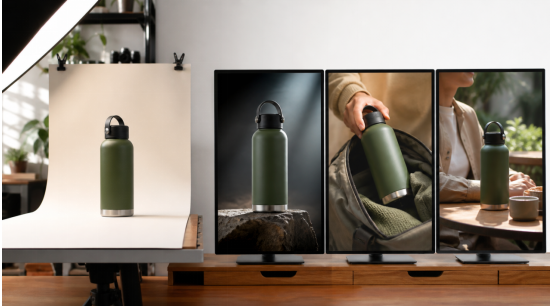
Suggested meta description: Turn a clean ecommerce product image into launch, feature, and social proof video concepts without confusing generation with final production.
Target keywords: AI video generator, image to video, product video, Seedance video generator, AI product ad
Small ecommerce teams often have a good hero photograph but no budget for three new shoots every month. That does not mean one image can replace a complete production. It does mean the same approved asset can become the starting point for several focused video concepts—if the team chooses jobs the source image can realistically support.
The mistake is asking one generation to produce an entire campaign. A better approach is to create three short videos with different purposes: a product reveal, a feature demonstration, and a social proof or lifestyle context. Each requires a different prompt, shot plan, and review standard.
Table of Contents
Prepare the Source Image
Begin with the highest-quality product image you own and have permission to use. The product should be sharply focused, fully visible, and large enough to reveal important details. Remove accidental clutter, but do not erase realistic shadows that help define shape.
If the product has a front and back, moving parts, or important side features, one photograph may not be enough. Add a second approved angle rather than expecting the model to invent unseen geometry accurately. For packaging, provide a clean label reference and plan to add exact small text during editing.
Write down the attributes that cannot change: shape, material, primary color, logo position, controls, closures, and scale. This short product anchor will be reused in all three concepts.
Concept One: The Product Reveal
The reveal is the safest place to begin because the product remains the center of attention. A simple sequence can move from texture or silhouette to the full item, then settle into a stable hero frame.
Choose one camera move. A slow arc, controlled push-in, or gentle top-down descent is easier to read than a chain of dramatic moves. Match the environment to the product: soft window light for skincare, a clean technical surface for electronics, or natural outdoor texture for travel equipment.
Keep the final frame still for a moment. Editors need room for a logo, price, or call to action. Do not rely on generated text for those elements. The video source should provide composition and movement; the editing stage should protect spelling and brand typography.
Concept Two: The Feature Demonstration
A feature video should show one benefit through one action. If the product is a leak-resistant travel mug, show it being placed in a moving bag without spilling. If it is a foldable lamp, show the hinge moving from closed to working position.
The action must be physically clear from the available references. If a hidden mechanism matters, supply a side view or motion reference. Do not ask the system to infer how a proprietary part works from a front-facing photograph.
Use the prompt to define the starting state, action path, and ending state. Give the movement enough time. Fast action may look energetic but can conceal exactly the feature the video is meant to prove.
An online AI video generator can help a small team prototype this sequence before committing to a reshoot. The output should be treated as a concept and reviewed for product accuracy, not automatically published because the movement appears convincing.
Concept Three: Lifestyle Context
The lifestyle version answers a different question: where does this product belong in the customer’s day? Place it in a recognizable situation, but keep the action modest. A backpack on a train seat, a desk before a video call, or a skincare bottle beside a morning mirror can establish use without requiring a complicated performance.
Use a reference for the person or environment when continuity matters. State the approximate scale of the product relative to the hand, bag, or table. Products often look wrong in AI footage not because their shape changes, but because they become subtly too large or too small.
Avoid simulated testimonials unless the speaker and claims are clearly fictional and appropriately disclosed. Lifestyle context can communicate relevance without inventing an endorsement.
Adapt the Same Idea for Different Placements
The reveal may work in 16:9 for a product page, while the feature demonstration may need a centered 9:16 composition for short-form social video. Plan safe zones before generation. Important details should not sit at the extreme edge of the frame.
Do not simply crop every wide output. A vertical version often needs a closer scale, fewer background objects, and slower lateral movement. Reuse the approved product anchor and references, but rewrite the shot for the new frame.
For paid social, test different opening visuals while keeping the central benefit stable. A close texture shot, a hand entering frame, and a quick environmental reveal can all introduce the same product without changing its claims.
Review Accuracy Before Aesthetics
Use two passes. The product pass checks geometry, logo, color, controls, scale, and realistic operation. The creative pass checks pacing, composition, lighting, and emotional fit. A video should not reach the second pass when it fails the first.
Compare the output directly with the source images. Ask someone familiar with the physical product to review it. A marketing editor may overlook an incorrect port or seam that a product manager notices immediately.
Document accepted and rejected details. If a certain angle repeatedly causes shape drift, stop spending attempts on it and redesign the shot around a reliable view.
Add Claims and Graphics in Post
Generated footage should not be responsible for exact prices, dimensions, safety claims, warranty terms, or promotional deadlines. Add them with normal editing tools and route them through the same approval process as any other advertisement.
Captions are also important. Social video is often watched without sound, and the feature should remain understandable in that context. Use readable contrast and leave enough time for the viewer to process one message at a time.
Move From Prototype to Repeatable System
Save the successful product anchor, negative constraints, approved reference images, and aspect-ratio notes. Record which shot types preserved the product reliably. The next campaign can reuse this production knowledge even when the creative concept changes.
A structured Seedance video generator workflow is most valuable when it turns one approved asset into controlled experiments—not when it encourages a team to publish the first attractive result. One product photo can support several useful videos, but every version still needs a clear job, an achievable action, and a product-accuracy review before it reaches customers.
