
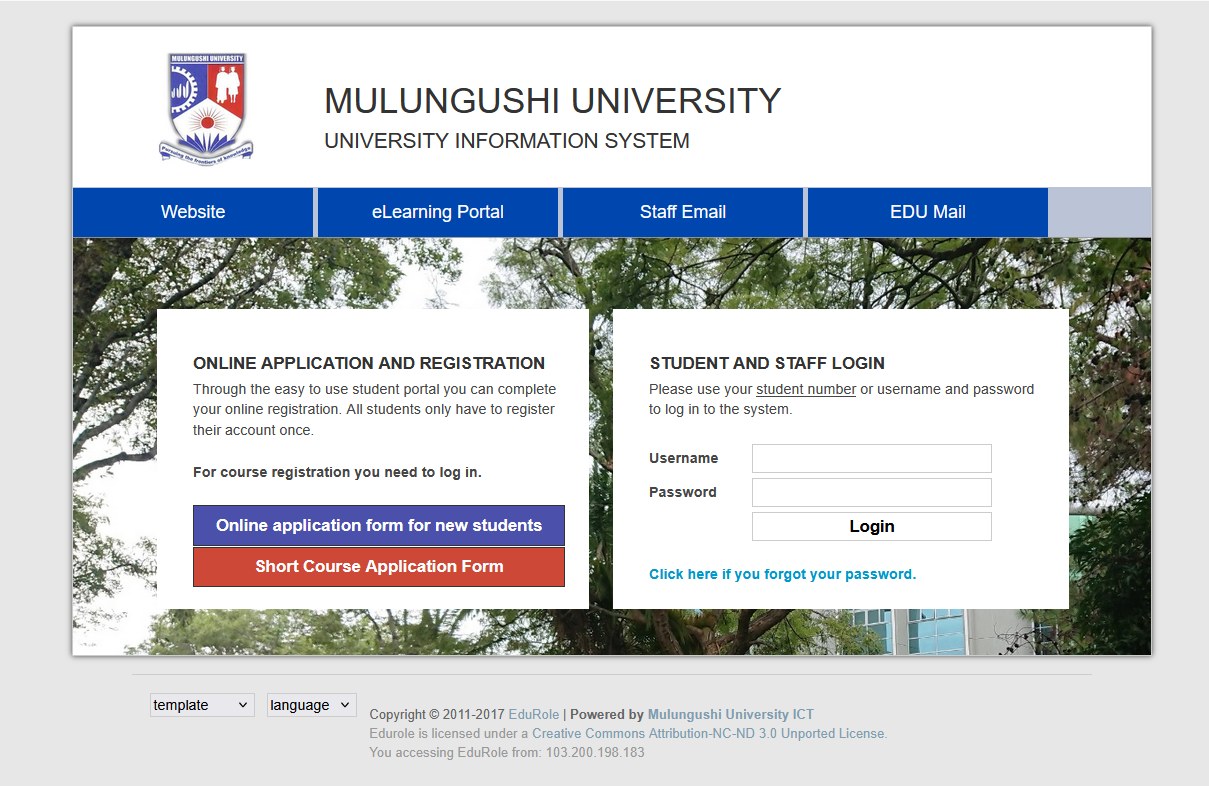
The Mulungushi University Student Portal is an essential online platform that helps students manage academic and administrative activities with ease. From course registration to checking exam results, the portal gives students convenient access to important university services anytime and anywhere.
Mulungushi University, one of Zambia’s leading public universities, uses a digital student management system that supports both on-campus and distance-learning students. The portal simplifies communication between students and the university while reducing paperwork and long queues.
Table of Contents
What Is the Mulungushi University Student Portal?
The Mulungushi University Student Portal is an online system designed for students, applicants, and university staff. It provides secure access to academic records, fee statements, online applications, and e-learning services.
The portal allows students to:
- Register courses online
- View examination results
- Pay tuition and other fees
- Access academic records
- Apply for admission
- Update personal information
- Access Moodle e-learning services
- Download important documents
The system is available 24/7, making it easier for students to handle academic tasks remotely.
Official Mulungushi University Portal Links
Here are the official online platforms used by Mulungushi University students:
- Main Website: www.mu.ac.zm
- Student Portal: edurole.mu.ac.zm
- Moodle E-Learning Platform: moodle.mu.ac.zm/moodle/
Students should always use official university websites to avoid security risks and incorrect information.
How to Access the Mulungushi University Student Portal
Logging into the student portal is simple and only takes a few steps.
Steps to Log In
- Visit the official student portal.
- Enter your username or student number.
- Type your password.
- Click the “Login” button.
- Access your student dashboard.
After logging in, students can access all available academic and administrative services from one dashboard.
Features of the Mulungushi University Student Portal
The portal offers several important features that improve the student experience.
Online Course Registration
Students can register for courses every semester through the portal without visiting administrative offices.
Fee Management
The system allows students to:
- View fee balances
- Print invoices
- Confirm payments
- Track financial records
Examination Results
Students can easily check semester results and monitor academic progress online.
E-Learning Access
The Moodle learning platform gives students access to:
- Lecture notes
- Assignments
- Online quizzes
- Discussion forums
- Course materials
This is especially useful for distance-learning students.
Admission Applications
Prospective students can apply online and track application status through the university portal.
Academic Records
Students can access transcripts, registration history, and other academic documents securely.
Benefits of the Student Portal
The Mulungushi University Student Portal provides many advantages, including:
- Faster access to university services
- Reduced paperwork
- Improved communication
- Easy access to academic information
- Convenient online learning
- 24/7 accessibility
The portal saves time and allows students to manage academic activities from anywhere.
How to Reset Your Portal Password
If you forget your password, follow these steps:
- Open the student portal login page.
- Click on “Forgot Password.”
- Enter your student number or username.
- Follow the password reset instructions.
- Create a new secure password.
Students should choose strong passwords to protect their accounts.
Common Login Problems and Solutions
Incorrect Username or Password
Double-check your login details before trying again.
Forgotten Password
Use the password recovery option on the login page.
Browser Issues
Clear your browser cache or try another browser if the portal does not load correctly.
Network Problems
Ensure you have a stable internet connection before accessing the portal.
Outstanding Fees
Some portal services may be restricted if tuition balances remain unpaid.
Tips for Using the Portal Safely
To keep your account secure:
- Never share your password
- Use strong passwords
- Log out after each session
- Avoid using public Wi-Fi for sensitive activities
- Update personal information regularly
Importance of the Moodle E-Learning Platform
Mulungushi University’s Moodle platform supports online and blended learning. Students can interact with lecturers, submit assignments, and access learning materials digitally.
This platform became especially important for remote learning and flexible education programs.
Student Support Services
Students experiencing technical issues can contact the university through the official website or student support offices. Support may include:
- Technical assistance
- Academic guidance
- Registration support
- Financial information
- Student welfare services
Conclusion
The Mulungushi University Student Portal is a valuable digital platform that makes university life easier and more efficient. From online registration to e-learning access, the portal helps students manage their academic journey conveniently.
By using the portal regularly, students can stay informed, organized, and connected with the university at all times.
FAQs About Mulungushi University Student Portal
What is the Mulungushi University Student Portal?
The Mulungushi University Student Portal is an online platform that allows students to manage academic and administrative activities such as course registration, fee payments, and checking results.
How do I log in to the student portal?
You can log in by visiting the official portal website and entering your student number or username along with your password.
What is the official Mulungushi University portal link?
The official student portal is available at edurole.mu.ac.zm.
Also Read: Anna Frey: Rising Star in Sports and Social Media
Can I access the portal on my phone?
Yes, the portal is mobile-friendly and can be accessed using smartphones, tablets, or computers.
What services are available on the student portal?
Students can:
- Register courses
- Check exam results
- Pay tuition fees
- Access academic records
- Update personal details
- Use Moodle e-learning services
How do I reset my portal password?
Click the “Forgot Password” option on the login page and follow the password recovery instructions.
Can new students use the portal?
Yes, newly admitted students receive login credentials after completing admission and registration processes.
What should I do if the portal is not loading?
You can try:
- Refreshing the page
- Clearing browser cache
- Switching browsers
- Checking your internet connection
Is the Moodle platform connected to the student portal?
Yes, Moodle supports the university’s online learning system and works alongside the student portal.
Can I check my exam results online?
Yes, students can view semester results and academic progress through the portal.
How do I register courses online?
After logging into the portal, navigate to the course registration section and select your courses for the semester.
Can I pay fees through the portal?
The portal allows students to view fee balances and payment records. Payment methods may vary depending on university guidelines.
Why is my portal account blocked?
Accounts may be restricted because of unpaid fees, incorrect login attempts, or incomplete registration requirements.
Is the student portal available 24/7?
Yes, the portal is generally accessible at any time, although occasional maintenance may temporarily affect access.
Who should I contact for technical support?
Students should contact Mulungushi University ICT support or the administration office through the official university website for assistance.

