
Today’s drivers expect their car to feel like a natural extension of their digital life — maps that update in real time, hands-free calls, and music that follows them from the living room to the highway. For Mercedes-Benz owners, the question of whether Apple CarPlay works with their infotainment system is one of the most searched topics in automotive tech. It sounds simple, but the answer depends heavily on which model you drive and what software it’s running.
Many owners of older Mercedes vehicles hit a frustrating wall: a premium car with a multimedia screen that simply won’t talk to their iPhone. Others find CarPlay available but struggle to activate it correctly. This article cuts through the confusion by clearly outlining which Mercedes models support Apple CarPlay, walking you through the integration process step by step, and exploring screen upgrade options for vehicles that didn’t come with native support. Whether you’re an iPhone user chasing seamless CarPlay connectivity or an Android user curious about Auto compatibility, you’ll find practical, actionable guidance here to get the most from your Mercedes infotainment system.
Table of Contents
Understanding Mercedes Infotainment Systems and Apple CarPlay
Mercedes-Benz has come a long way from its early in-car entertainment setups. The COMAND system, introduced in the late 1990s, offered navigation and basic audio control but felt rigid by modern standards. Its successor, MBUX (Mercedes-Benz User Experience), launched in 2018 and represented a genuine leap forward — featuring a touchscreen interface, natural language voice control, and a more intuitive layout. Yet even MBUX’s capabilities don’t eliminate the desire many drivers have to run their iPhone’s ecosystem directly through the car’s multimedia screen.
Apple CarPlay bridges that gap by mirroring a simplified version of your iPhone’s interface onto a compatible display. It brings familiar apps — Maps, Messages, Spotify, Podcasts, and more — into the car environment, optimized for glanceability and minimal distraction. Siri handles voice commands so drivers can send texts, make calls, or reroute navigation without lifting a finger from the wheel. The safety argument alone is compelling: keeping your eyes on the road while staying connected is exactly what CarPlay is designed to support.
For Mercedes and Apple CarPlay users, CarPlay transforms the multimedia screen from a proprietary system into a flexible hub that works in harmony with their daily digital habits. Rather than learning a new interface or re-entering contacts, everything transfers seamlessly from the iPhone. That continuity — from your living room to your commute — is precisely why CarPlay compatibility has become one of the most important features drivers look for in a modern Mercedes infotainment setup.
Compatibility Check: Which Mercedes Models Support CarPlay?
Native Apple CarPlay support in Mercedes-Benz vehicles generally begins with models produced from 2016 onward, though the rollout wasn’t uniform across the lineup. The C-Class (W205), E-Class (W213), S-Class (W222), GLC, GLE, and GLS were among the first to receive CarPlay capability, either as standard equipment or an optional add-on. By 2019, Mercedes had broadened availability significantly, making CarPlay standard on most new models equipped with the MBUX system. If your vehicle was manufactured between 2016 and 2018, CarPlay support may depend on which infotainment hardware trim was installed at the factory — not every build from that era included it automatically.
Software updates also play a role. Some earlier MBUX-equipped vehicles received CarPlay functionality through over-the-air or dealer-applied updates, so checking with a Mercedes dealership about your specific VIN is worth the effort. Vehicles still running the older COMAND system — typically pre-2016 models — do not support CarPlay natively and require an aftermarket solution to gain that functionality.
Android Auto compatibility follows a similar timeline, with Mercedes rolling it out alongside CarPlay on most supported models. One important distinction: wireless CarPlay became available on select Mercedes models from around 2020, eliminating the need for a USB cable entirely. Owners of 2016–2019 vehicles with wired CarPlay support cannot always upgrade to wireless without a hardware change. Confirming your model year, infotainment generation, and current software version is the most reliable first step before attempting any CarPlay setup.
Steps to Integrate Apple CarPlay with Your Mercedes
Prerequisites and Initial Setup
Before attempting to connect CarPlay, confirm that your iPhone is running iOS 7.1 or later — though iOS 12 or newer is strongly recommended for the best performance. Any iPhone 5 or later will work, but newer models deliver noticeably smoother app response on the Mercedes multimedia screen. For wired CarPlay, use an Apple-certified Lightning or USB-C cable rather than a generic third-party option, since uncertified cables frequently cause dropped connections. If your Mercedes supports wireless CarPlay, ensure both Bluetooth and Wi-Fi are enabled on your iPhone before you begin. On the vehicle side, verify that CarPlay is enabled in the infotainment settings — some Mercedes models ship with it turned off by default and require a one-time activation through the MBUX menu or COMAND interface.
Step-by-Step Connection and Activation Guide
Start the engine or set the ignition to accessory mode so the infotainment system fully powers on. For wired connection, plug your iPhone into the vehicle’s USB port — typically located in the center console or glove compartment. A prompt should appear on your iPhone asking whether to trust the connection; tap “Trust” to proceed. On the Mercedes screen, navigate to Settings, then select “Connections” or “Smartphone Integration,” and choose Apple CarPlay from the available options. The CarPlay interface will load within a few seconds, displaying your compatible apps in a simplified grid layout.
For wireless CarPlay on supported models, go to your iPhone’s Bluetooth settings and pair with the Mercedes system first. Once paired, the car will automatically detect wireless CarPlay capability and prompt activation through the infotainment menu. After the initial pairing, connection happens automatically each time you enter the vehicle with your iPhone nearby.
To customize the experience, press and hold any app icon on the CarPlay home screen to rearrange shortcuts. Frequently used apps like Maps, Messages, and your preferred music service are worth placing in the primary row for quick access. Siri activates via the voice button on the steering wheel, letting you send messages, place calls, or switch destinations entirely hands-free.
Enhancing Your Experience: Mercedes Screen Upgrades and Multimedia Features
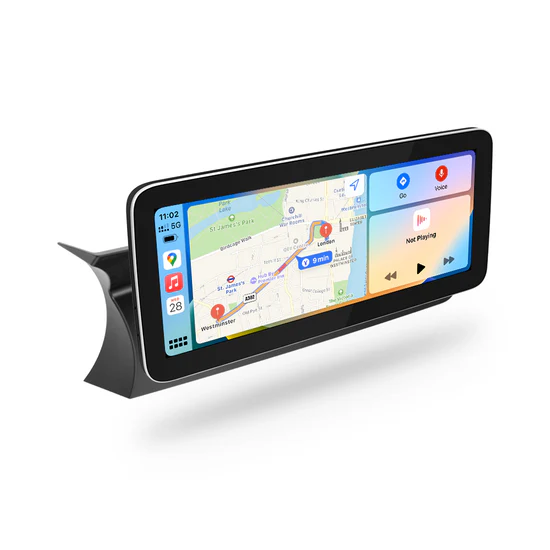
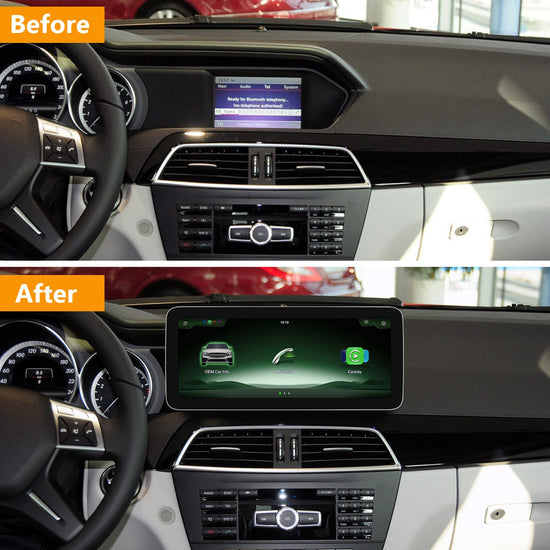
Owners of pre-2016 Mercedes vehicles aren’t locked out of the CarPlay experience — aftermarket screen upgrades have matured into a genuinely capable solution. These retrofit units replace the factory display with a modern touchscreen that supports both Apple CarPlay and Android Auto, effectively bringing older COMAND-equipped vehicles into the current era of smartphone integration. Specialists in this space, such as PEMP Car Audio, offer Mercedes-specific retrofit screens designed to slot into the existing dashboard cavity, preserving the car’s original aesthetic while dramatically expanding its multimedia capabilities.

The practical benefits go beyond CarPlay access. Aftermarket screens designed for Mercedes vehicles often feature higher display resolution, improved brightness for daylight visibility, and faster processor response compared to aging factory hardware. Many units also support wireless connectivity, meaning no cable is needed once the initial pairing is complete. Integration with existing vehicle systems — steering wheel controls, reverse cameras, and climate display — is preserved in quality retrofit kits, so the upgrade feels factory-fitted rather than bolted on.
For owners of 2016–2019 models with wired CarPlay who want to go wireless, targeted interface modules are available that add wireless capability without replacing the entire head unit. This is a less invasive option that delivers a meaningful quality-of-life improvement. Regardless of the approach, professional installation is recommended to ensure proper wiring, software configuration, and compatibility with Mercedes-specific vehicle data systems. A well-executed screen upgrade transforms the multimedia experience without compromising the vehicle’s premium feel.
Comparing Apple CarPlay with Android Auto for Mercedes Owners
Both Apple CarPlay and Android Auto are supported on compatible Mercedes models, but choosing between them comes down entirely to which smartphone you carry. CarPlay is exclusive to iPhones running iOS 12 or later, while Android Auto requires an Android device running Android 6.0 or newer. Neither system works cross-platform, so your phone determines your path before any other consideration enters the picture.
Functionally, the two systems are more similar than different. Both project a simplified interface onto the Mercedes multimedia screen, support voice-activated assistants (Siri for CarPlay, Google Assistant for Android Auto), and provide access to navigation, messaging, and music apps. Where they diverge is in ecosystem depth. CarPlay integrates tightly with Apple Maps, iMessage, and Apple Music, while Android Auto connects seamlessly with Google Maps, which many drivers consider the stronger navigation platform. Third-party app support — Spotify, WhatsApp, Waze — is broadly comparable across both systems. Mercedes introduced wireless support for both platforms on newer models, so neither has a hardware advantage on vehicles from 2020 onward. If you’re deciding between the two purely on in-car performance within a Mercedes, the experience is equally polished — your existing smartphone ecosystem is simply the deciding factor.
Troubleshooting Common Issues with CarPlay in Mercedes
Even on fully compatible Mercedes models, CarPlay doesn’t always behave perfectly out of the box. The most common complaint is intermittent disconnection during wired use — usually caused by a faulty or uncertified cable. Swapping to an Apple-certified Lightning or USB-C cable resolves this in most cases. If the connection still drops, try a different USB port in the vehicle, as some Mercedes models have ports designated specifically for data transfer rather than charging only.
Audio cutting out or failing to route through the car’s speakers typically points to a Bluetooth conflict. Disable Bluetooth briefly, reconnect via USB, and re-enable it afterward to reset the audio path. Screen unresponsiveness — where CarPlay loads but touch input stops registering — usually clears after restarting both the iPhone and the infotainment system. Hold the MBUX power button or consult your owner’s manual for the correct reset procedure for your model.
Software mismatches are another frequent culprit. Ensure your iPhone is running the latest iOS version and check whether a firmware update is available for your Mercedes infotainment system through the dealer or Mercedes me portal. If CarPlay fails to appear as an option in the settings menu entirely, the feature may need to be enabled by a dealer through a software activation code. Persistent issues that survive these steps — particularly on retrofitted systems — warrant professional diagnosis to rule out wiring or configuration errors.
Making the Most of CarPlay in Your Mercedes
Apple CarPlay compatibility with Mercedes-Benz vehicles isn’t a simple yes or no — it depends on your model year, infotainment generation, and current software version. Most Mercedes models from 2016 onward support CarPlay natively, with wireless capability arriving on newer builds from around 2020. Owners of older COMAND-equipped vehicles still have a clear path forward through aftermarket screen upgrades that deliver modern functionality without compromising the car’s premium character.
Getting CarPlay running correctly comes down to the basics: a certified cable, updated iOS, and proper activation through the infotainment menu. When issues arise, most can be resolved through straightforward troubleshooting steps before professional help becomes necessary. For those weighing CarPlay against Android Auto, the choice ultimately follows your smartphone — both platforms perform equally well within a compatible Mercedes system.
Mercedes-Benz continues to refine its infotainment technology, and staying current with software updates through the Mercedes me portal or your dealership ensures you’re getting the best performance your system can offer. Take a moment to confirm your vehicle’s compatibility, check for available updates, and consider whether a screen upgrade makes sense for your driving experience. The technology to stay genuinely connected on every journey is well within reach.

