
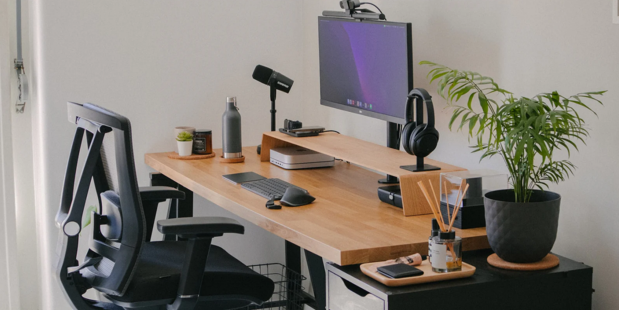
Working from home has become part of everyday life for millions of Pakistanis. From freelancers in Lahore to corporate employees in Karachi managing hybrid schedules, more people than ever are sitting at makeshift desks for 8 to 10 hours a day. The problem? Most home setups were never designed for sustained work, and the result is a familiar trio of complaints: lower back pain, neck stiffness, and end-of-day exhaustion.
The good news is that setting up a genuinely ergonomic home office in Pakistan doesn’t have to cost a lot. With a few key adjustments — and one important investment — you can transform whatever corner you work from into a space that supports your body properly. Here’s how.
Table of Contents
1. Start With the Right Chair — Everything Else Follows
If there’s one thing worth spending money on in a home office, it’s the chair. You can make do with a basic table, a second-hand monitor, and a borrowed keyboard. But sitting 8+ hours a day on a dining chair or a sagging sofa will catch up with you faster than you think.
An ergonomic chair is built to support the natural curve of your spine, keep your hips and knees at healthy angles, and reduce strain on your back and shoulders. For Pakistani workers, there are a few additional factors to consider:
- Breathable mesh back — With Karachi’s humidity and Lahore’s summer heat regularly crossing 40°C, a mesh backrest is far more practical than foam or leather. It keeps air circulating against your back even when the AC is off during load-shedding.
- Adjustable lumbar support — This is non-negotiable. Your lower back has a natural inward curve that most cheap chairs ignore. Look for a chair where the lumbar support can be moved up or down to hit your specific back position.
- Height adjustment — Your feet should rest flat on the floor with knees at roughly 90 degrees. If your feet dangle, your chair is too high. If your knees rise above your hips, it’s too low.
- 3D armrests — Fixed armrests are almost always the wrong height. Adjustable armrests let your shoulders sit relaxed rather than shrugged upward or dropped awkwardly.
Brands like Dimensions Seating offer locally available ergonomic chairs designed with these features at price points suited to the Pakistani market — a much better starting point than imported options that take weeks to arrive and come with no local support.
2. Get Your Desk Height Right
Once your chair is set correctly, the desk needs to match it — not the other way around. A common mistake is adjusting the chair to suit a fixed desk, which throws off every other measurement.
The formula is simple: sit in your chair with feet flat and knees at 90 degrees. Let your arms hang naturally, then bend your elbows to 90 degrees. The height of your elbows from the floor is your ideal desk surface height. For most Pakistani adults this falls between 70 and 76 cm.
💡 Quick fix: Standard Pakistani dining tables are typically 74–76 cm — right in the ergonomic sweet spot for average heights. If you’re currently using one as your desk, you may already be at the right height. What’s likely wrong is your chair, not your table.
If your desk is too high and not adjustable, try raising your chair height and adding a footrest (a thick book works as a temporary solution). If it’s too low, a simple wooden platform from a carpenter can raise it for a few hundred rupees.
3. Fix Your Monitor Position
The monitor is the most-ignored part of home office ergonomics, yet it’s directly responsible for neck pain and headaches that millions of remote workers chalk up to “stress” or “screen time.”
The rule: the top edge of your screen should sit at eye level when you’re sitting upright. Your natural downward gaze (around 15–20 degrees) should land on the centre of the screen. If your monitor is sitting flat on your desk, it is almost certainly too low — you’re looking down at it all day, which compresses the cervical spine.
- Raise it: A monitor stand, laptop riser, or a stack of thick books all work. Monitor stands are available at Hafeez Centre in Karachi and Hall Road in Lahore for PKR 800–3,000.
- Distance: Position the screen roughly 50–70 cm away — about an arm’s length. Too close causes eye fatigue. Too far causes squinting and forward head posture.
- Glare: Place your monitor perpendicular to windows, not facing them. Pakistan’s harsh afternoon sun creates serious screen glare — sheer curtains help diffuse it without darkening the room.
- Laptop users: If you work on a laptop, get a stand and pair it with an external keyboard and mouse. This is one of the single highest-impact changes you can make for neck health.
4. Sort Out Your Lighting
Poor lighting causes eye strain and headaches that most people blame on their screen. It’s usually the lighting around the screen that’s the real problem.
- Switch to 4000K–5000K “natural white” LED bulbs in your workspace. Most Pakistani homes use 6500K cool-white bulbs which are harsher on the eyes. The difference in eye fatigue is noticeable within a few days.
- Add a desk lamp. Overhead lights alone create shadows on your work surface. A simple lamp to the left of your monitor (for right-handed users) provides even, focused light.
- Load-shedding plan: Keep a rechargeable LED lamp at your desk. Working by phone flashlight for two hours is a guaranteed headache. Even a basic battery lamp connected to your UPS makes a meaningful difference.
5. Pakistan-Specific: Managing Heat During Work Hours
Western ergonomic guides never mention this, but for anyone working in Karachi, Hyderabad, Multan, or Lahore during summer, thermal comfort is a genuine productivity issue. Sitting in a leather or foam chair in 38°C heat — especially during load-shedding — is physically draining in a way that no monitor adjustment can fix.
A breathable mesh chair makes a noticeable difference even with the AC on — and a significant difference when it’s off. If you’re choosing between two otherwise similar chairs, always pick the mesh option for Pakistani conditions. You can browse locally available ergonomic chairs designed specifically for extended daily use in local climate conditions.
A few additional heat management habits worth adopting:
- Position your fan or AC vent to circulate air around the room rather than blowing directly at you — direct cold air on the neck causes muscle stiffness within hours.
- Keep your UPS, router, and desktop tower on the floor or a side table rather than your desk surface. These generate significant heat in a small room.
- Morning cross-ventilation (two opposite windows open) is more effective than a single fan and costs nothing.
6. Build in Movement — The Habit That Ties Everything Together
Even a perfect ergonomic setup can’t compensate for sitting still for six hours straight. The body needs movement to maintain circulation, release muscle tension, and stay mentally sharp.
Three simple habits make most of the difference:
- Every 20 minutes: look at something at least 6 metres away for 20 seconds. This is the 20-20-20 rule and it dramatically reduces eye strain. Looking out a window at a distant building works perfectly.
- Every 45–60 minutes: stand up. Walk to the kitchen, step outside for two minutes, or just stand at your desk briefly. This restores blood flow to your legs and lower back.
- End of day: spend 5 minutes doing three simple back stretches — a seated forward fold, a standing back extension, and a seated spinal twist. This undoes most of the compression from a day of sitting and takes less time than scrolling Instagram.
What to Budget: A Quick Pakistan-Specific Guide
You don’t need to upgrade everything at once. Here’s where to spend first:
| Item | Priority | Budget Option | Recommended |
| Ergonomic Chair | 🔴 Highest | PKR 18,000–25,000 | PKR 35,000–65,000 |
| Desk (correct height) | 🔴 High | PKR 8,000 (carpenter) | PKR 12,000–25,000 |
| Monitor Stand / Riser | 🟡 Medium | PKR 0 (books) | PKR 800–3,000 |
| Ext. Keyboard & Mouse | 🟡 Medium | PKR 1,500 | PKR 3,000–8,000 |
| Desk Lamp (4000K LED) | 🟢 Lower | PKR 1,200 | PKR 2,000–4,000 |
| Footrest | 🟢 Lower | PKR 0 (thick book) | PKR 1,500–3,000 |
Spend 70% of your budget on the chair. Everything else can be phased in over time or sourced cheaply. The chair is the only piece of equipment in your home office that physically supports your body every single hour of every working day.
Conclusion
Setting up an ergonomic home office in Pakistan is less about buying expensive equipment and more about making the right adjustments in the right order. Get your chair right first, then your desk height, then your monitor. Add a good lamp, manage the heat, and build in regular movement. These changes together — most of which cost nothing — will have a bigger impact on how you feel at the end of a workday than any productivity app or supplement.
The one investment worth making: a proper ergonomic chair from a trusted local supplier. Your back will notice the difference within a week, and your productivity will follow.

